← All projects

BUSINESS TOOLS / WEB PROJECT

Oyibo SchoolOS

A welcoming website. A connected school day.

Oyibo SchoolOS · School website demonstration
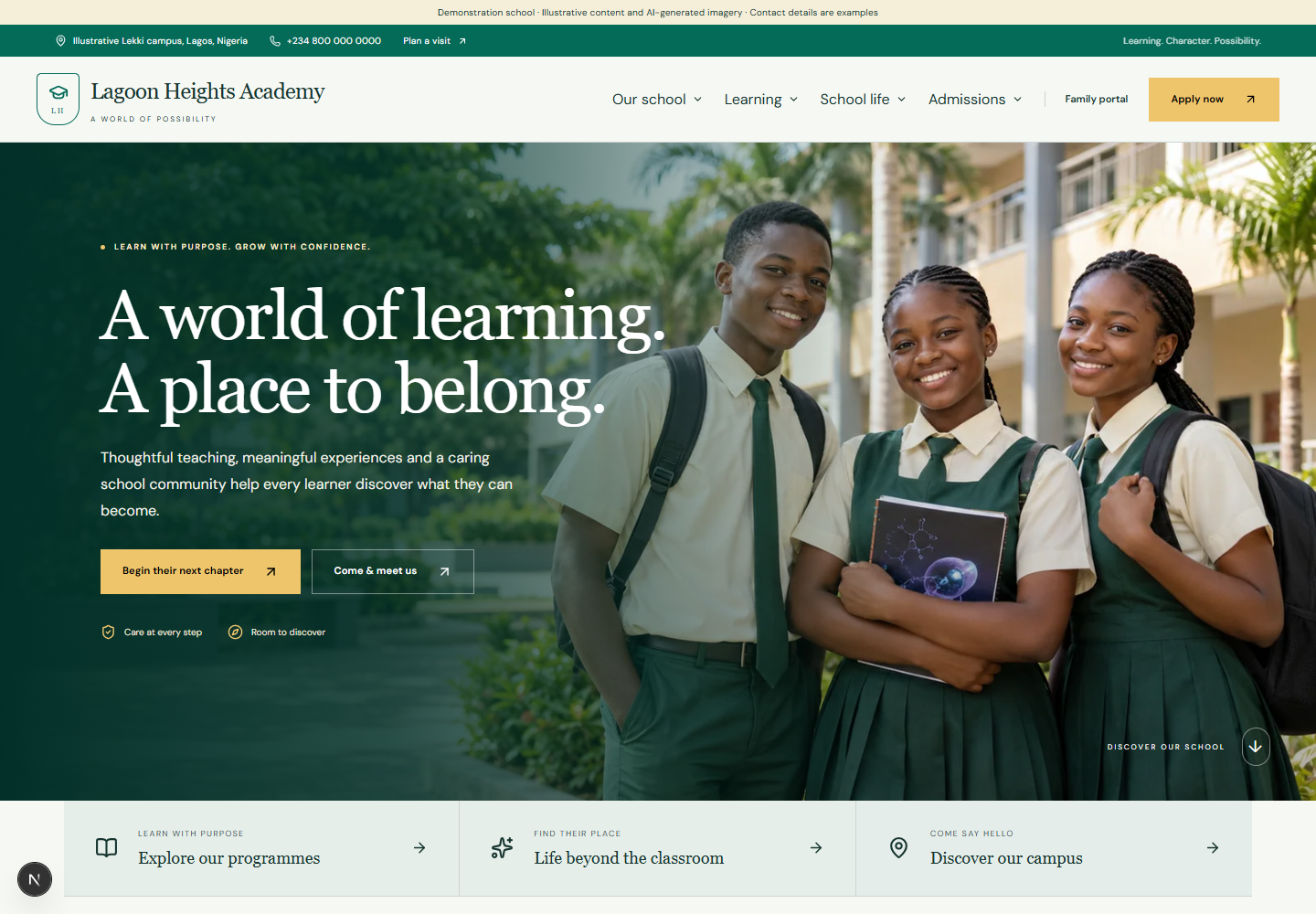
Lagoon Heights Academy, a fictional SchoolOS demonstration, with a green and gold school identity, photographic welcome, learning links and admissions entry points
The Lagoon Heights demonstration school, rendered by the working SchoolOS web application. School names, contacts, policy examples and AI-generated pupil imagery are illustrative. Schools can apply their own logo and colours; the application is currently demonstrated locally rather than offered as a live-school deployment.
Open full-resolution image (opens in a new tab)

A school website should be the beginning of a connected experience. Oyibo SchoolOS brings the public front door and the daily running of a school into one responsive web platform. A family can discover the school, apply online and, once the school verifies its relationships and approvals, continue through the same connected records into learning updates, permissions and fees. Staff work from shared student, family, employee, class, campus and term information rather than maintaining disconnected lists. Built around Nigerian private nursery, primary and secondary schools, the product combines school-specific branding with flexible academic structures, NGN finance and Africa/Lagos dates. Its depth extends beyond student administration: reviewed installment plans, double-entry accounts, payroll, transport handovers, boarding, library, meals, school care and safe collection all have defined workflows. Automation carries information between these areas while preserving the human checks needed for admissions, money, safeguarding and publication. The responsive web product is available for guided demonstration with fictional schools. A live-school rollout follows provider activation, school-specific configuration and pilot review. Native Android and iOS applications are a separate next phase.

PROJECT SCOPE

  • Integrated school website, administration and family ecosystem
  • School branding, public CMS, policies and consent-aware media
  • Online enquiries, applications, offers and enrollment
  • Applicant fees and secure processing-payment links
  • Student, family, staff and campus records
  • Academic planning, attendance, homework and results
  • Verified parent, student and employee access
  • Clubs, competitions, events, trips and permissions
  • Installment fees, scholarships, discounts and collections
  • Double-entry accounting, reconciliation and opening migration
  • Purchasing, suppliers, inventory and fixed assets
  • Staff leave, teaching cover and Nigerian payroll workflows
  • Transport, boarding, library, meals and early-years care
  • Restricted health, authorised pickup, visitors and incidents
  • Communication, operational automation, exports and audit
  • Modular access, onboarding and fixed-term Oyibo package quotes

01 / THE BRIEF

A clear purpose.

Give a school one coherent digital operating environment, from its public identity to the work that happens after the first bell. The starting audience is Nigerian private nursery, primary and secondary schools, with the flexibility to organise Nigerian or British class structures, operate multiple campuses and control access by responsibility. The brief combines a polished school website and editable public content with admission-to-enrollment continuity, student and family records, academic work, parent and student access, fee collection, general accounting, payroll and the practical operations that keep a school day moving. An event should connect its public page, eligible learners, guardian permission and any fee. A verified payment should connect the balance, receipt and ledger. A late boarding return or incomplete transport handover should become an actionable staff task. Clear review gates connect the experience: staff check applications and verify family access, finance confirms bank receipts, authorised staff approve reports and payroll, and school leaders control publication. The public demonstration presents fictional schools, synthetic imagery and sample policies as examples of the configurable product.

02 / THE APPROACH

Design meets function.

Build an integrated Oyibo platform that each school can make its own. Shared student, family, employee, class, campus and term records connect the website, staff workspace and family experience. Approved public content gives the school a welcoming front door, while role-specific daily views help teachers, finance teams, parents and operational staff focus on their own work. Schools can enable the modules they need. Editorial school pages, meaningful imagery and six named palettes establish a recognisable school identity. An administrator can apply the school logo, customise colours, shape the homepage and preview the brand on desktop and phone. Structured page drafts, separate publication, accessible image descriptions and consent-aware galleries support ongoing content management. Automation carries work between modules. An application becomes admission review, enrollment prepares verified family access and fee review, approved activity participation can create its invoice, and a verified payment connects balance, receipt and accounts. Late returns, outstanding handovers and low stock become assigned tasks. Reviews, a visible retry queue and audit records keep consequential steps traceable. The technical foundation supports controlled rollout: school and campus isolation, current family permissions, private documents, exact monetary values, reviewed financial snapshots and versioned business rules. Oyibo can coordinate school identity and content, data imports, academic and fee settings, deployment preparation and role-based onboarding. Production activation, independent specialist reviews and a representative pilot remain defined delivery steps.

03 / THE EXPERIENCE

Built around real tasks.

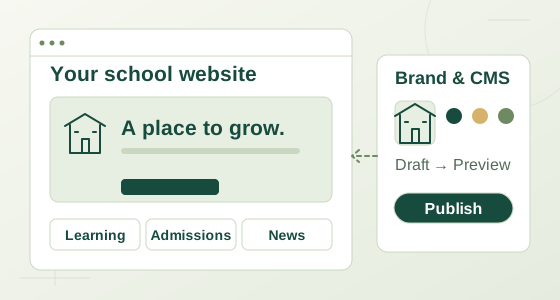
A school website connects named colour palettes, content drafts and approved publication.
01

A school website with its own identity

Give each school a branded public home with domain mapping, three template settings, six named or custom palettes, a logo, imagery and desktop/phone previews before saving. Administrators manage headline and welcome copy, contact details, section order, SEO and pages for the school story, head message, academic stages, campus, facilities, admissions, fees, student life, news and events. Drafts, private content preview, publication, archive and retained history stay separate. Policy examples cover privacy, terms, cookies, safeguarding, admissions, fees/refunds, complaints, accessibility and acceptable use; they need adaptation for a real school. Gallery publication checks permission and expiry, with immediate withdrawal. Essential-only cookie preferences are included.

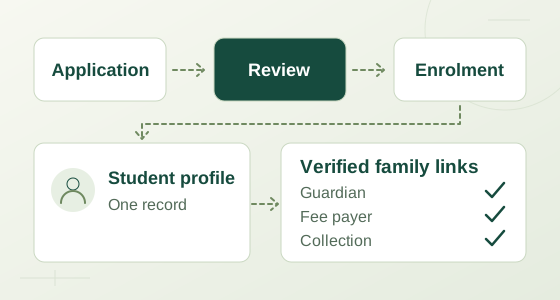
An enquiry progresses through application, staff review and an offer into enrollment and fee review.
02

From first enquiry to the first school day

Public enquiries and applications enter the same admissions workspace used by staff, with a source field for campaign enquiries, document checklists, staff-arranged appointments, age and capacity checks, waitlisting, expiring offers and branded offer PDFs. A configured application processing fee creates its own invoice and private, expiring payment link without enrolling the child or granting portal access. Actual verified receipts satisfy the fee requirement; processing revenue is recognised separately, and reviewed refunds handle genuine overpayments rather than cancellation of the original charge. Enrollment reuses the application to create the student, a pending family relationship and welcome/review tasks. Selecting an approved tuition plan prepares an individual fee preview for bursar review; an explicit manual tuition route records its term and guards against a later duplicate charge.

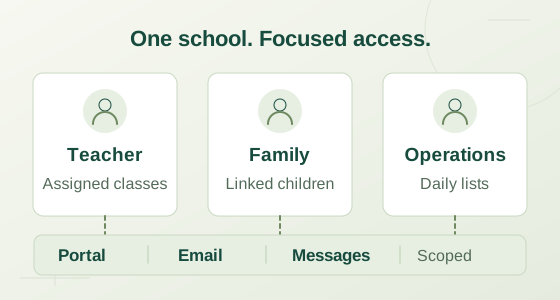
Shared school records connect to separate authorised teacher, family, finance and operations views.
03

One record, the right view for every person

Shared student, family, employee, class, campus, session and term records connect the system. Student records retain documents, enrollment history, promotion, transfer, departure and graduation. Administrators, teachers, finance, HR, nurses and operations staff receive authorised views and daily work; families and students see the records their current permissions allow. Verified academic, payment and consent rights are independent, so a payer can handle an invoice without receiving learning records and a consent guardian can approve an eligible activity without an academic portal. Families can work across their authorised children, see learning and published results, communicate with school and manage applicable fees and permissions. Staff can retrieve their own posted payslips. Matching contact details never grant access, and revocation takes effect on the next request.

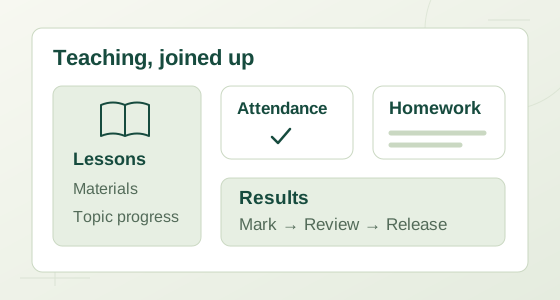
Lessons, attendance and homework connect to assessment review and published reports.
04

Learning, attendance and results that stay connected

Organise academic sessions and terms, Nigerian, British or Early Years class labels, teachers, subjects and weekly lessons. Timetable checks detect clashes, while lesson plans, materials and progress records support daily teaching. Attendance can be drafted on the device, saved with a version check and approved only after the active class register is complete; authorised corrections retain a reason and history. Homework supports assignments, attachments, student submissions, grading and feedback. CA/exam weights and grade policies are versioned, and report preparation, review, approval, publication and PDF export preserve the exact policy and student/class context used. Progression does not rewrite earlier reports. Early-years development observations are also recorded.

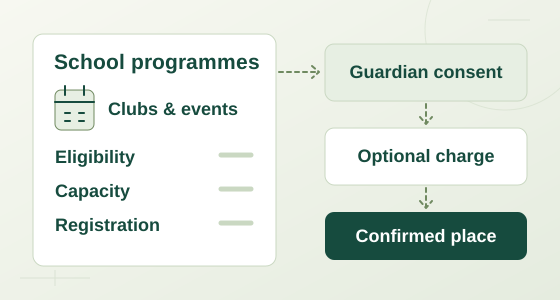
A school programme connects eligible learners, available places, guardian consent and its fee.
05

School life beyond the classroom

Create clubs, competitions, events and trips with eligible classes, places, registration dates, programme dates, mandatory or optional participation, guardian permission and a defined fee. Publication can make the approved public description, image, venue and schedule available on the website while keeping participants and private school details protected. Required programmes provision eligible participation records; where consent is required, confirmation and charging wait for permission. Optional registration checks eligibility, dates, capacity and the guardian's independent consent and payment rights. A confirmed paid registration creates its invoice atomically, with repeat protection. Staff then work from participant and programme-attendance records.

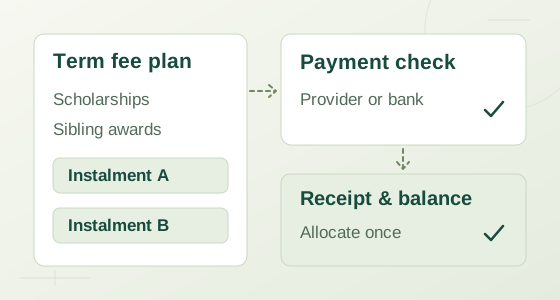
A reviewed fee plan leads to installments, verified collection, receipts and an updated balance.
06

Clear fees for the school and the family

Reviewed term/class fee plans define fee codes, installment dates and exact shares. Independently approved scholarships and discounts based on verified family relationships feed a saved preview showing each child's award, sibling rank, net charge and installments. Generation freezes that calculation and creates each student/term/fee-code obligation once; later policy edits do not silently reprice history. Collections support partial payments, allocations across children's invoices, deposits, receipts, credits, reviewed refunds and bank matching. Uploaded bank evidence creates a pending review notice and task, never an automatic receipt; finance confirms the actual school-bank transaction before reducing debt. Verified provider excess is preserved as a student deposit. Due-date reminders recheck the remaining balance and current payer permission before delivery. Live online checkout uses each school's own merchant account and is disabled in the fictional demo.

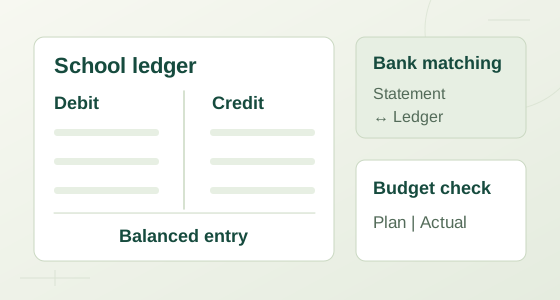
Balanced debit and credit entries connect school accounts, bank matching, budgets and reports.
07

Accounts with a traceable financial story

A persistent NGN double-entry ledger connects school receivables, deferred and earned revenue, bank/cash, deposits, supplier payables and the other subsidiary records. Balanced postings, integer-kobo amounts, protected control accounts, closed periods and immutable posted entries support controlled correction rather than rewriting history. Central schoolwide views provide trial balance, balance sheet, income/expense totals, classified monthly cash flow, account budgets against actuals and subsidiary balances. Cash reporting separates operating, investing and financing activity, opening cash and visible classification exceptions. Reviewed opening CSV migration can establish a fresh ledger together with student receivables/deposits, supplier AP, stock and asset schedules without posting the same balances twice. Statements require accountant classification and reconciliation; comparative/date-range statutory presentation, specialised opening schedules and non-cash financing disclosures remain further work.

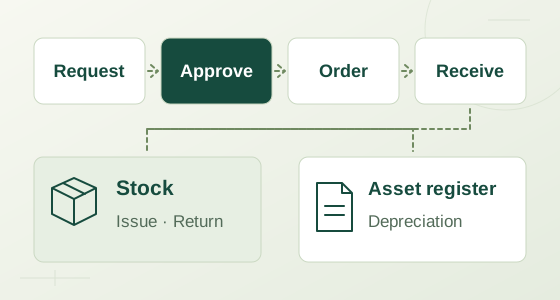
Purchase approval, goods receipt, supplier invoice, stock movement and asset records remain separate connected steps.
08

Purchasing, suppliers, stock and school assets

A purchase request moves through independent approval, partial goods receipt, supplier invoice and actual bank payment as separate events. Received stock passes through the goods-received-not-invoiced control account before invoicing transfers the amount to payables. Inventory records quantity and value, weighted-average issues, returns at original issue cost, physical counts and minimum-stock exceptions. Fixed assets retain cost, residual value and useful life for sequential monthly straight-line depreciation. Non-stock service or expense bills use an independent review and AP-accrual workflow with reserved partial settlements and separately verified bank payments; each currently uses one expense account. Reviewed supplier credit notes preserve the original bill, reduce unpaid AP first and place paid amounts due back into a separate recovery receivable. A verified bank refund clears that receivable. Shared supplier and bank references help reject reuse across financial workflows.

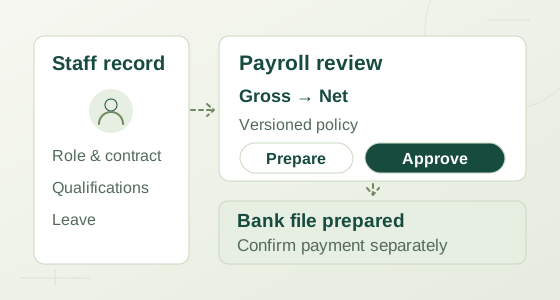
Payroll calculation passes through independent review, payslips, payment file and separately confirmed settlement.
09

People administration and reviewed payroll

Maintain staff employment, qualification references, leave requests, decisions and teaching-cover arrangements. Payroll links the same staff identity to basic, housing, transport and other components, benefits, deductions, advances, bank details and explicit opening year-to-date balances. Effective-dated policies capture their source and professional review; cumulative PAYE, employment/unpaid-day prorating and applicable pension, NHF and employer contributions are calculated against the selected snapshot. A run moves from draft through independent approval to expense/liability posting, private payslips and a bank payment file. Exporting that file never marks salaries paid: actual salary payment and statutory remittances are confirmed separately. The seeded policy is a draft requiring expert review, not a claim of legal approval. Automated bank transfers, government submission and agency-specific statutory return templates are not supplied.

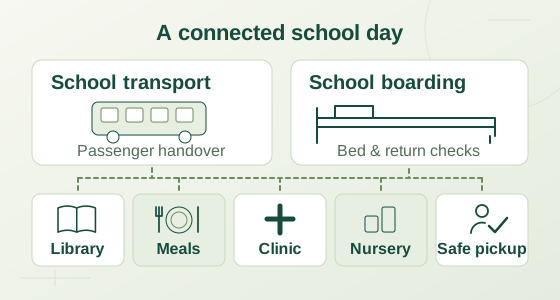
Transport, boarding, library, meals, clinic, nursery and safe collection connect around daily school operations.
10

The practical details of a safer school day

Transport connects routes, stops, vehicle, driver, escort and capacity to planned passenger lists, boarding and recorded handovers; a journey cannot close while boarded children remain undelivered. Boarding tracks rooms/beds, exclusive allocations, rollcall, approved leave and expected/actual returns. Library copies have barcodes, loans, returns, renewals and lost-book charges. Meal plans carry essential allergen instructions and approved alternative servings. Restricted clinic records hold care consent, emergency instructions and school visits; operational lists expose only necessary instructions. Families can authorise, expire or revoke collectors, while staff verify identity before pickup, record early departures and require a documented exceptional-release decision where appropriate. Visitors and incidents have their own records. Nursery journals cover meals, naps, toileting, mood, family notes and development observations.

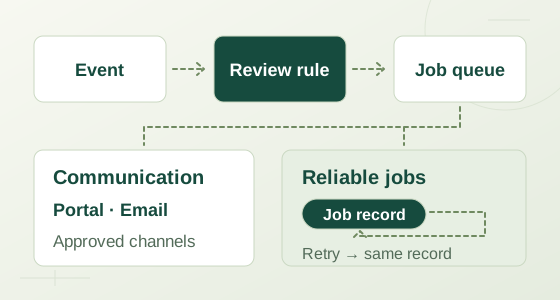
School events produce assigned tasks, review, notifications and a visible retry queue.
11

Automation that turns exceptions into work

Application submission creates review work; enrollment creates welcome and fee-review tasks; programme publication prepares the connected public presence and configured announcement. Approved attendance can queue absence notices, published reports can notify linked families, and verified payments connect balance, receipt and ledger while stale reminders are suppressed. Scheduled checks create responsible-staff tasks for late boarding returns, overdue loans, remaining passenger handovers and low stock, then close resolved exceptions. A configured payroll date prepares a draft or a setup-resolution task for finance. Announcements, student-linked message threads, replies, requests and complaints share the communication workspace. Rules set recipients, channels, delays and approval requirements; a transactional outbox, separate worker, audit and visible retry queue make failures reviewable. Portal notifications work internally. External email, SMS and WhatsApp need configured providers and recipient opt-in, and are disabled for demo schools; provider acceptance does not mean a message was read.

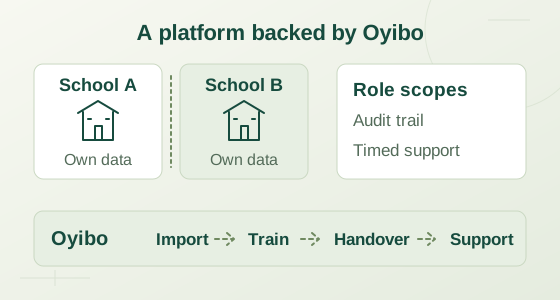
School isolation, scoped access and audit connect to Oyibo school setup, data imports and onboarding.
12

A modular foundation for an Oyibo rollout

Tenant and campus boundaries, server-side record permissions, PostgreSQL row-level security, revocable sessions and independently verified family links protect each school's workspace. The identity integration supports Cognito/OIDC with verified identities and privileged authenticator requirements; production accounts still need configuration. Private documents, scoped CSV/PDF exports, validated student/staff/family-contact imports and audit support onboarding and daily administration. A versioned REST/OpenAPI layer shares the business rules used by the web system. Modules can be disabled on the server as well as hidden in navigation. Oyibo setup and fixed-term package quotes use a term-start student census and saved pricing policy, separately from student fees; they do not collect subscription money. Deployment and encrypted recovery scripts are supplied, but hosted rollout, restore rehearsal and a real-school pilot remain pending. The responsive web interface currently starts in English; native mobile apps follow a later phase.

04 / WEB TECHNOLOGY

What makes it work.

Web experience

  • Next.js
  • React
  • TypeScript
  • Responsive CSS
  • Lucide icons
  • Shared school palette tokens

Application and data

  • Node.js
  • PostgreSQL
  • Row-level security
  • Transactional SQL
  • pg-boss
  • Transactional outbox
  • Zod validation

Identity and integration contracts

  • OpenID Connect
  • PKCE
  • Opaque server sessions
  • REST API v1
  • OpenAPI 3.1
  • AWS SDK
  • Signed Paystack webhooks

Documents and verification

  • pdf-lib
  • CSV import and export
  • Vitest
  • Playwright
  • Actual PostgreSQL integration tests
  • Encrypted backup scripts

05 / INTEGRATIONS

Connected where it counts.

PostgreSQL and pg-boss

Implemented · Local demonstration

Persistent school, academic, finance and operational records run in PostgreSQL. Row-level tenant policies, scoped relationships and domain permissions work alongside transactional events and a separate pg-boss worker. Internal portal notifications and review/retry queues are implemented. This local development setup is not evidence of a hosted production capacity or availability guarantee.

Amazon Cognito / OpenID Connect

Implemented · Production setup required

The production identity adapter uses authorization-code OIDC, PKCE, verified identities, revocable application sessions and privileged authenticator checks. A Frankfurt user pool, actual accounts, explicit school memberships, MFA setup and provider acceptance testing are still required. Demo role selection is restricted to fictional schools and never establishes production access.

Paystack school and applicant checkout

Implemented · Disabled in demo

Per-school merchant credentials support student invoice and separate applicant-fee checkout, partial amounts, signed webhooks, independent provider verification and recovery of missed callbacks. Reference, amount, currency and school metadata are checked before financial posting. Genuine excess funds remain a student deposit or applicant credit. No live provider payment has been performed; demo schools are blocked even if keys are present. Actual bank/provider payouts and refunds remain authorised human actions recorded through the relevant workflow.

Amazon SES email and SNS SMS

Adapters implemented · Not enabled

Outbox-driven email and SMS delivery require a non-demo school, explicit live flags, verified sender/account setup, AWS permission and the recipient's channel opt-in. School rules can delay or require approval before dispatch. Sensitive updates direct people to the secure portal rather than exposing private financial or clinical detail. No external email or SMS was sent; an accepted provider request is distinct from delivered or read communication.

WhatsApp Business / Meta Cloud API

Adapter implemented · Not enabled

The notification worker can use a configured Meta Cloud API sender with an approved utility template and recipient opt-in. Sender approval, access credentials, supported template/language settings and live acceptance testing remain necessary. Demo schools cannot send external WhatsApp messages, and the product does not claim free-form or unrestricted WhatsApp delivery.

Cloudflare R2 EU private documents

Implemented · Cloud setup required

The private-file adapter supports an EU R2 endpoint with role, campus and linked-record authorization checked on each request. Private documents are streamed through the application and never become public gallery images. Fictional local demonstrations use private local storage. Production bucket credentials, retention settings and cloud recovery checks have not been provisioned by this build.

Render Frankfurt deployment

Configuration supplied · Not deployed

Deployment configuration separates the Next.js web application, background worker and PostgreSQL, with container and encrypted backup/restore scripts supplied. Domains, DNS/SSL, production secrets, hosted service sizing, provider acceptance and a complete recovery rehearsal remain operator work. No external hosting deployment or completed live-school pilot is represented by this portfolio presentation.

Pilot delivery and the next phase

Web pilot preparation

The working product is ready for guided demonstrations and further pilot validation. Oyibo setup can cover school branding and content, domain preparation, validated imports, academic and fee settings and role-based onboarding. A real-school release requires provider acceptance, opening-balance reconciliation, independent Nigerian accounting/payroll and privacy reviews, hosted capacity checks and an executed recovery drill. The current English CMS uses structured forms: block type/title/body are editable, while complete visual block controls, some surrounding website copy and editing existing programme titles/descriptions need further work. Staff arrange admissions appointments; a public booking calendar and automatic timetable generation are not included. Native Android/iOS, online examinations, live/video classes, GPS and biometric devices are separate future work. No completed real-school pilot or statutory certification is claimed.

NEXT PROJECT / E-COMMERCE

Mambilla Premium

CURRENTLY FULLY BOOKED

Good work
takes focus.